

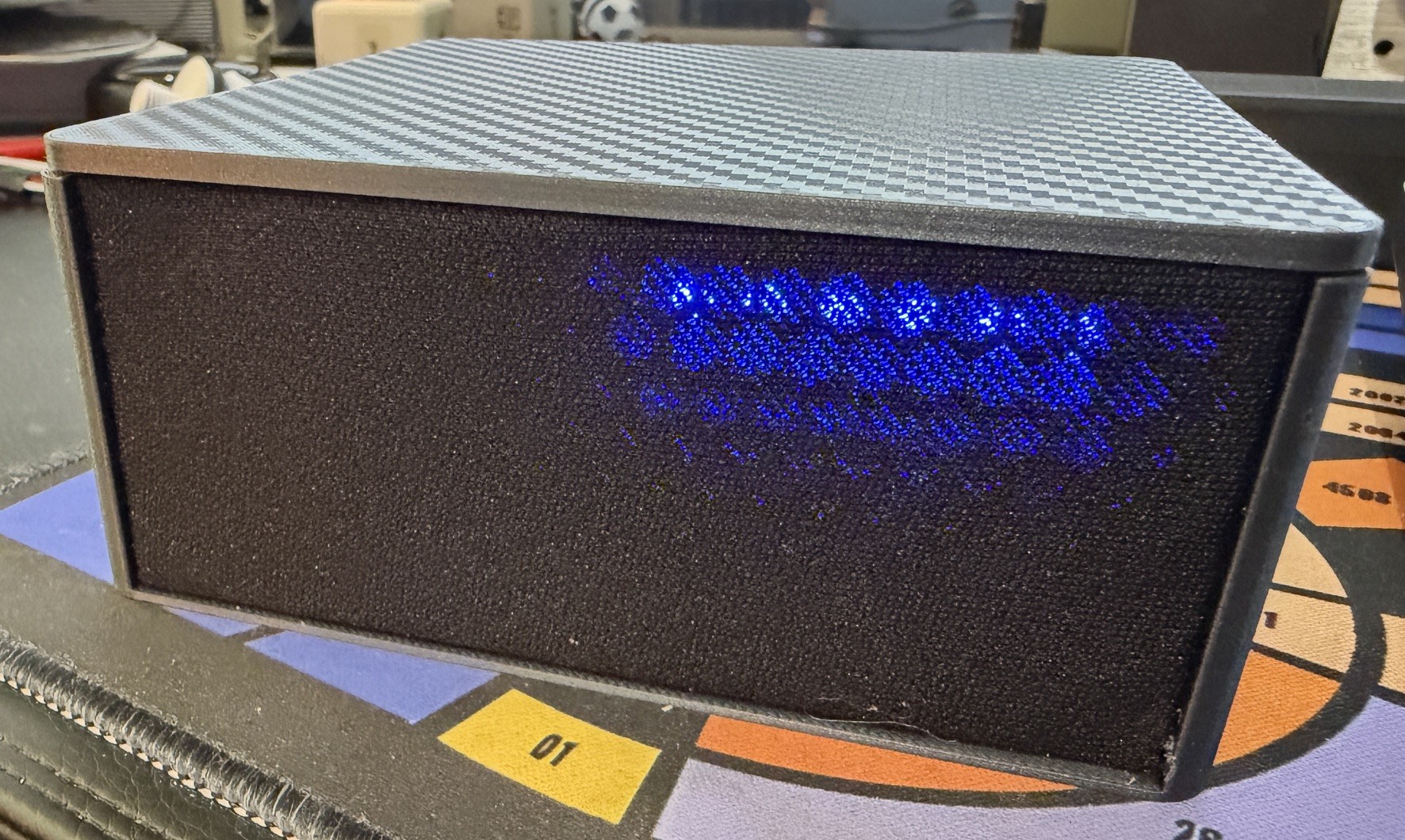
I built an ESP32-S3 voice satellite for the office. It worked. Then I set a timer, the timer went off, and I discovered I couldn’t turn it off by voice — because the alarm was so loud the microphone couldn’t hear me over it.
Fixing that properly meant ripping out the entire audio layer and replacing it with acoustic echo cancellation. This post covers how, plus the boot loop that cost me an hour on the way there.
Parts
Optional Speaker Cloth for front grill
TL;DR
Skip to the botton for the code
The build
The starting point was Tristam’s ESP32-S3 voice assistant: an ESP32-S3-WROOM-1, an INMP441 MEMS microphone, a MAX98357A I²S amplifier driving a 45mm full-range driver, and an eight-LED WS2812 strip for status. Home Assistant Assist for the voice pipeline, Music Assistant for playback.
Two corrections before anyone follows that wiring diagram. The LED data wire in the published image goes to DOUT on the LED board. It needs to go to DIN. WS2812s are a daisy chain — data enters at DIN, passes through each LED, exits at DOUT to feed the next strip. Wired to DOUT, nothing lights up. This was flagged in the comments back in 2024 and never fixed in the image. The below is the correct wiring
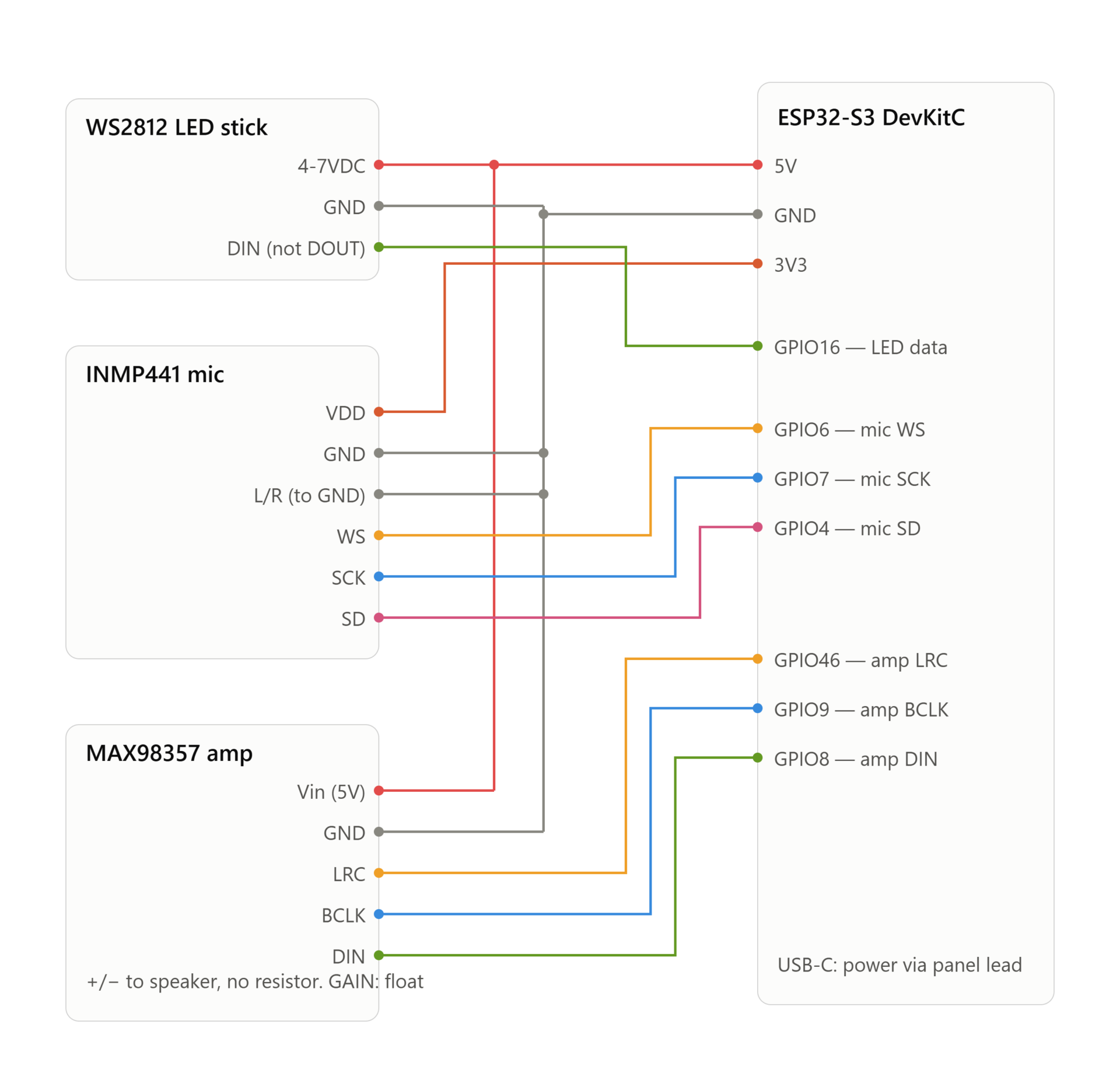
The second one looks like a mistake but isn’t: the microphone’s L/R pin goes to ground as well as the GND pin. L/R isn’t a second ground, it’s channel select. Tied low the INMP441 transmits in the left timeslot, tied high it transmits in the right. Your ESPHome config has to agree with the wire. Don’t leave it floating — it’s a digital input with no defined default, and a floating pin gives you audio that works on the bench and dies in the enclosure.
The boot loop with no error message
First flash, and the serial console gave me this on repeat:
ESP-ROM:esp32s3-20210327
Build:Mar 27 2021
rst:0x8 (TG1WDT_SYS_RST),boot:0x8 (SPI_FAST_FLASH_BOOT)
Saved PC:0x4038aab4
SPIWP:0xee
mode:DIO, clock div:1
load:0x3fce2820,len:0x1510
entry 0x403c8914
ROM loader output, then nothing. No second-stage bootloader, no ESPHome banner, no panic handler, no backtrace. Just TG1WDT_SYS_RST — the Timer Group 1 watchdog — killing the chip a few hundred milliseconds in, over and over.
The complete absence of output is the diagnostic. The firmware was dying before the logger existed. That narrows it enormously: something in very early init.
It was PSRAM. The ESP32-S3-WROOM-1 ships in variants, and the two you’ll meet are N8R2 (8MB flash, 2MB quad-SPI PSRAM) and N16R8 (16MB flash, 8MB octal-SPI PSRAM). They need different config:
| Module marking | psram: mode: | esp32: flash_size: |
|---|---|---|
| N8R2 | quad | 8MB |
| N16R8 | octal | 16MB |
I had assumed N8R2 because that’s what the commonly-linked Amazon boards ship. Mine was N16R8. The marking is printed on the shielding can — read it, don’t guess.
What made it silent rather than merely broken is this pair of sdkconfig options, which most voice assistant configs set because they speed up wake word inference considerably:
CONFIG_SPIRAM_RODATA: "y"
CONFIG_SPIRAM_FETCH_INSTRUCTIONS: "y"
Those move executable code and read-only data into PSRAM at boot. So when PSRAM init fails, the chip isn’t just short of memory — it’s trying to execute from a region that doesn’t work. Hence the hang with nothing on the wire.
If you hit this and the module marking looks right, comment those two lines out temporarily. That stops code executing from PSRAM, the boot survives long enough to reach the logger, and you get an actual error like PSRAM ID read error instead of a silent watchdog reset. They’re a performance optimisation, not a requirement.
The real problem: it can’t hear you over itself
With the thing booting, adopted into Home Assistant and playing music through Music Assistant, the actual limitation showed up.
Set a timer. Timer goes off. Alarm plays through the speaker at full volume, roughly ten centimetres from the microphone. Say “stop” — nothing. Say it louder — nothing. The only way to silence it is to open the app.
Same story with music playing. Wake word detection that’s rock solid in a quiet room becomes useless the moment the device is making noise.
Before assuming the cause, isolate the variable. I muted the speaker output while leaving everything else running — LEDs still flashing along with the (now silent) alarm — and said “stop”. Instant detection.
That single test rules out an entire category of wrong answers. The wake word model is fine. The sensitivity threshold is fine. The phase logic that’s supposed to catch a wake word during a ringing timer is fine. The microphone is fine. The problem is purely that the speaker is drowning the microphone.
Which also tells you what won’t help, and this is worth internalising because it’s where people burn a weekend. Turning up gain_factor doesn’t help. Raising wake word sensitivity doesn’t help. Both amplify the alarm and your voice by exactly the same amount. The signal-to-noise ratio is unchanged and all you’ve bought is false accepts.
Only three things change the ratio: make the interfering sound quieter, put physical distance or damping between speaker and mic, or subtract the speaker signal from the microphone input in software. That last one is acoustic echo cancellation, and it’s the only option that solves the general case.
Two cheap fixes first
Both worth trying before the rebuild, because they take minutes.
Widen the gap between alarm repeats. The timer sound loops with a configurable pause between repeats — commonly 500ms. Wake word inference needs roughly a second of unmasked audio to get a detection. Push the gap to 1500ms and you get a rhythmic alarm with real silent windows for “stop” to land in:
id(external_media_player)->set_playlist_delay_ms(
    speaker::AudioPipelineType::ANNOUNCEMENT, 1500);
This fixes the timer case specifically and does nothing for music.
Decouple the speaker from the case. If the driver is screwed hard into the enclosure, it’s exciting the whole shell, and a microphone bolted to that same shell picks it up as structure-borne vibration — not airborne sound. Stuffing between them does nothing about that; plastic doesn’t care about wadding. A foam or rubber gasket between the driver flange and its mounting face, or nylon screws with rubber washers, breaks that path for everything in the box at once.
Adding acoustic echo cancellation
AEC works by using the speaker output as a reference signal. The device knows exactly what it’s playing, so it can model how that sound reaches the microphone and subtract it, leaving your voice. It’s the same technique that stops conference calls echoing, and it’s why a commercial smart speaker can hear you over its own music.
ESPHome doesn’t ship it. As of 2026.7.0 there’s no AEC component in the official docs — not under the microphone domain, not as an audio preprocessor, nowhere. The ESP32-S3 is perfectly capable of it (Espressif’s ESP-SR library does exactly this, and it’s what the official Home Assistant Voice PE hardware uses) but it isn’t exposed in mainline ESPHome YAML.
What does exist is a pair of external components from the esphome-audio-stack project: esp_audio_stack and esp_aec. They’re built for a VoIP project but explicitly usable standalone.
Understand the scope before you start
esp_aec does nothing on its own. It needs a phase-coherent copy of what the speaker is playing, frame by frame, and that’s what esp_audio_stack provides. The audio stack takes ownership of both I²S buses, captures the speaker reference on the way out, handles rate conversion, and then exposes ordinary ESPHome microphone and speaker platforms on top.
So this is not a component you bolt on. It replaces your entire I²S layer. The good news is that everything above that layer — mixer, resamplers, media player, wake word, voice assistant, all your LED scripts and timer logic — carries over untouched. The microphone it hands you is post-AEC, so wake word detection runs on cleaned audio automatically.
The configuration
Pull the components in:
external_components:
  - source: github://n-IA-hane/esphome-audio-stack@main
    components: [esp_audio_stack, esp_aec]
Then replace the whole i2s_audio: block and your platform: i2s_audio microphone with this:
esp_audio_stack:
  id: audio_stack
  rx_bus:
    i2s_num: 0
    i2s_bclk_pin: GPIO7
    i2s_lrclk_pin: GPIO6
    i2s_din_pin: GPIO4
  tx_bus:
    i2s_num: 1
    i2s_bclk_pin: GPIO9
    i2s_lrclk_pin: GPIO46
    i2s_dout_pin: GPIO8
  sample_rate: 48000          # speaker bus rate
  output_sample_rate: 16000   # mic / AEC / wake word / VA rate
  bits_per_sample: 32
  slot_bit_width: 32
  mic_channel: left           # INMP441 L/R tied to GND = LEFT slot
  rx_slot_mode: stereo
  processor_id: aec_processor
  aec_reference: ring_buffer
  aec_reference_buffer_ms: 80
  buffers_in_psram: true
  aec_ref_ring_in_psram: true
  audio_task_stack_in_psram: true

esp_aec:
  id: aec_processor
  sample_rate: 16000
  filter_length: 4
  mode: sr_low_cost

microphone:
  - platform: esp_audio_stack
    id: mic_main
    esp_audio_stack_id: audio_stack
Swap your hardware speaker over, keeping whatever mixer and resampler chain you already had — just point the mixer’s output_speaker at this instead:
speaker:
  - platform: esp_audio_stack
    id: hw_speaker
    esp_audio_stack_id: audio_stack
    sample_rate: 48000
    bits_per_sample: 16
Finally, point micro_wake_word and voice_assistant at mic_main.
Four settings that matter more than the rest
mic_channel must match your wiring. L/R grounded means left. Get this wrong and you get total silence — no error, no warning, just a microphone that returns nothing. It’s the most likely reason a first flash appears dead.
mode: sr_low_cost — not one of the FD or VOIP modes. The component offers several AEC engines. SR modes use linear echo cancellation that preserves the spectral features the neural wake word model depends on; FD and VOIP modes suppress residual echo more aggressively at the cost of those features. If your goal is being heard over playback, SR is the one. Avoid sr_high_perf entirely — it wants a large contiguous DMA-capable block and fails preflight on the S3.
aec_reference: ring_buffer for a discrete microphone plus a separate I²S amplifier. There’s a lighter previous_frame mode that reuses the prior transmit frame, but the ring buffer gives better frame alignment on exactly this kind of no-codec board. Fall back to previous_frame only if you’re short on RAM.
Drop your old gain_factor. Whatever you’d set to compensate for a quiet raw microphone is now compensating for the wrong thing. Start at unity on the clean stream and add gain back only if detection is weak.
Housekeeping before you flash
- Set your logger to
INFO. AEC eats roughly 7ms of a 16ms frame budget, on top of wake word inference and audio decode.DEBUGlogging was merely wasteful before; now it’s likely to cause actual audio glitches and API disconnects. - Trim your wake word models. Every loaded model costs RAM you now need elsewhere. Keep the one you actually use.
- Check your ESPHome version. These components need 2026.6.4 or newer.
- Keep your working config in a separate file. Don’t edit in place. If this goes wrong you want a 60-second path back to a device that functions.
- No Bluetooth. BLE components and audio pipelines on the same ESP32 are a well-documented crash generator. Don’t add one to find out.
The result
It works. The wake word is detected while the alarm is ringing at full volume, and while music is playing. AEC is gated automatically — it only engages when the speaker has produced audio in the last 250ms, so during silence the microphone passes through unprocessed and the adaptive filter can’t drift and start suppressing your voice.
Once it’s up, test in this order, because “it boots and hears me in a quiet room” is not the same as “AEC is working”: timer alarm at full volume, then music at high volume, then interrupting a long TTS reply mid-sentence. If the first two pass, revert the 1500ms repeat gap — that workaround is for a problem you no longer have.
The catch
This is an external component from a single-maintainer project under active development, and its last major release was explicitly breaking. Pointing @main at it means a rebuild in six months could pull something quite different.
Pin to a tag or a specific commit once you’re happy with the behaviour. And watch it for a few days under real use before declaring victory — the failure mode with this stack isn’t a dramatic boot loop, it’s occasional audio glitches or API disconnects under sustained playback.
Lessons learned
- Read the marking on the module before you flash. The ESP32-S3-WROOM-1 N8R2 and N16R8 need different PSRAM and flash settings, and getting it wrong produces a boot loop with no error output at all.
- Silence in the logs is itself a diagnostic. Firmware that dies before the logger initialises narrows the search to early init — PSRAM, flash layout, partition table.
- Isolate the variable before you theorise. Muting the speaker and retrying the wake word took ten seconds and eliminated four wrong explanations at once.
- Gain is not signal-to-noise ratio. Amplifying the input amplifies the interference equally. If the speaker is drowning the microphone, no sensitivity setting will save you.
- Structure-borne coupling ignores acoustic damping. Foam between speaker and mic does nothing about vibration travelling through a shared enclosure. Isolate the driver from the case instead.
- Echo cancellation is the difference between a demo and a device. Everything else on a DIY voice satellite can be very good and it will still feel broken if it goes deaf whenever it makes a sound.
The Full Code
# ESP32-S3 voice satellite with acoustic echo cancellation
# INMP441 mic + MAX98357A amp on separate I2S buses, WS2812 status bar.
#
# Audio layer: esp_audio_stack + esp_aec (external components).
# Everything above the audio layer (mixer, media player, LEDs, timers) is
# adapted from AndreyShpilevoy/Home-Assistant-Smart-Speaker.
#
# BEFORE FLASHING:
# 1. Read the marking on the module's shielding can:
# N8R2 -> psramMode: quad, flash_size: 8MB
# N16R8 -> psramMode: octal, flash_size: 16MB
# Wrong values = boot loop with no error output.
# 2. mic_channel must match your wiring. INMP441 L/R tied to GND = left.
# Wrong value = total silence, no error.
# 3. Fill in the secrets below (see secrets.yaml example at the bottom).
#
# WIRING
# MAX98357A: LRC=GPIO46 BCLK=GPIO9 DIN=GPIO8 Vin=5V GAIN=float
# INMP441: WS=GPIO6 SCK=GPIO7 SD=GPIO4 L/R=GND VDD=3V3
# WS2812 bar: DIN=GPIO16 (data goes to DIN, not DOUT), 5V
# No series resistor on the speaker -- volume is handled in software.
substitutions:
name: smart-speaker
friendly_name: Smart Speaker
device_description: "ESP32-S3 Voice Assistant Media Speaker"
# Credentials are referenced with !secret directly in the api:/ota:/wifi:
# blocks below — ESPHome does not support !secret inside substitutions.
#pins
# I2S Audio SPK (MAX98357 — its own bus)
i2s_lrclk_pin_out: GPIO46
i2s_bclk_pin_out: GPIO9
i2s_dout_pin_spk: GPIO8
# I2S Audio MIC (INMP441 — its own bus)
i2s_lrclk_pin_in: GPIO6
i2s_bclk_pin_in: GPIO7
i2s_din_pin_mic: GPIO4
#Led's
led_pin: GPIO48 # on-board LED
led_bar_pin: GPIO16 # Light Bar LED (wire to DIN on the stick)
min_brightness_night: '0.11'
max_brightness_night: '0.21'
min_brightness_day: '0.60'
max_brightness_day: '0.80'
min_brightness_night_percent: 11%
max_brightness_night_percent: 21%
min_brightness_day_percent: 60%
max_brightness_day_percent: 80%
timezone: "Europe/London"
psramMode: octal # N16R8 (8MB PSRAM) = octal. N8R2 (2MB PSRAM) = quad.
# Phases of the Voice Assistant
# The voice assistant is ready to be triggered by a wake word
voice_assist_idle_phase_id: '1'
# The voice assistant is waiting for a voice command (after being triggered by the wake word)
voice_assist_waiting_for_command_phase_id: '2'
# The voice assistant is listening for a voice command
voice_assist_listening_for_command_phase_id: '3'
# The voice assistant is currently processing the command
voice_assist_thinking_phase_id: '4'
# The voice assistant is replying to the command
voice_assist_replying_phase_id: '5'
# The voice assistant is not ready
voice_assist_not_ready_phase_id: '10'
# The voice assistant encountered an error
voice_assist_error_phase_id: '11'
# # MUTED: The voice assistant is muted and will not reply to a wake-word
# voice_assist_muted_phase_id: '12'
# Change this to true in case you have a hidden SSID at home.
hidden_ssid: "false"
esphome:
name: ${name}
friendly_name: ${friendly_name}
comment: ${device_description}
min_version: 2026.6.4
on_boot:
priority: 375
then:
# Run the script to refresh the LED status
- script.execute: control_leds
- delay: 1s
# If after 10 minutes, the device is still initializing (It did not yet connect to Home Assistant), turn off the init_in_progress variable and run the script to refresh the LED status
- delay: 10min
- if:
condition:
lambda: return id(init_in_progress);
then:
- lambda: id(init_in_progress) = false;
- script.execute: control_leds
external_components:
# Pinned to the commit this config was validated against (2026-07-17).
# Track @main only if you want to follow upstream changes.
- source: github://n-IA-hane/esphome-audio-stack@d03a546051d80bf263ba85c465e2db7224448abc
components: [esp_audio_stack, esp_aec]
esp32:
board: esp32-s3-devkitc-1
cpu_frequency: 240MHz
variant: esp32s3
flash_size: 16MB # N16R8 = 16MB. N8R2 = 8MB.
framework:
type: esp-idf
version: recommended
sdkconfig_options:
CONFIG_ESP32S3_DATA_CACHE_64KB: "y"
CONFIG_ESP32S3_DATA_CACHE_LINE_64B: "y"
CONFIG_ESP32S3_INSTRUCTION_CACHE_32KB: "y"
# Moves instructions and read only data from flash into PSRAM on boot.
# Both enabled allows instructions to execute while a flash operation is in progress without needing to be placed in IRAM.
# Considerably speeds up mWW at the cost of using more PSRAM.
CONFIG_SPIRAM_RODATA: "y"
CONFIG_SPIRAM_FETCH_INSTRUCTIONS: "y"
CONFIG_BT_ALLOCATION_FROM_SPIRAM_FIRST: "y"
CONFIG_BT_BLE_DYNAMIC_ENV_MEMORY: "y"
CONFIG_MBEDTLS_EXTERNAL_MEM_ALLOC: "y"
CONFIG_MBEDTLS_SSL_PROTO_TLS1_3: "y" # TLS1.3 support isn't enabled by default in IDF 5.1.5
wifi:
id: wifi_id
fast_connect: ${hidden_ssid}
ssid: !secret wifi_ssid
password: !secret wifi_password
ap:
password: !secret fallback_ap_password
power_save_mode: none
on_connect:
- script.execute: control_leds
on_disconnect:
- script.execute: control_leds
captive_portal:
network:
enable_ipv6: true
logger:
# INFO, not DEBUG. AEC uses ~7ms of a 16ms frame budget; verbose logging
# on top of that causes audio glitches and API disconnects.
level: INFO
logs:
sensor: WARN
api:
encryption:
key: !secret api_encryption_key
id: api_id
on_client_connected:
- script.execute: control_leds
on_client_disconnected:
- script.execute: control_leds
ota:
- platform: esphome
id: ota_esphome
password: !secret ota_password
psram:
mode: ${psramMode}
speed: 80MHz
time:
- platform: homeassistant
id: ha_time
timezone: ${timezone}
interval:
- interval: 60sec
then:
- if:
condition:
lambda: return (id(ha_time).now().hour > int(id(day_switch_time).state) && id(ha_time).now().hour < int(id(night_switch_time).state));
then:
- lambda: id(min_brightness) = ${min_brightness_day};
- lambda: id(max_brightness) = ${max_brightness_day};
else:
- lambda: id(min_brightness) = ${min_brightness_night};
- lambda: id(max_brightness) = ${max_brightness_night};
globals:
# Global variable tracking if the volume was recently changed. Used to draw LED animations with specific brightness
- id: volume_changed
type: bool
restore_value: no
initial_value: 'false'
# Global variable storing the min level of brightness. Used to draw LED animations with specific brightness
- id: min_brightness
type: double
restore_value: no
initial_value: ${min_brightness_night}
# Global variable storing the max level of brightness. Used to draw LED animations with specific brightness
- id: max_brightness
type: double
restore_value: no
initial_value: ${max_brightness_night}
# Global initialization variable. Initialized to true and set to false once everything is connected. Only used to have a smooth "plugging" experience
- id: init_in_progress
type: bool
restore_value: no
initial_value: 'true'
# Global variable tracking the phase of the voice assistant (defined above). Initialized to not_ready
- id: voice_assistant_phase
type: int
restore_value: no
initial_value: ${voice_assist_not_ready_phase_id}
# Global variable storing the first active timer
- id: first_active_timer
type: voice_assistant::Timer
restore_value: false
# Global variable storing if a timer is active
- id: is_timer_active
type: bool
restore_value: false
switch:
# This is the mute switch that mute mic and set volume to 0%. It is exposed to Home Assistant.
- platform: template
id: mute_switch
restore_mode: RESTORE_DEFAULT_OFF
icon: "mdi:volume-mute"
name: Mute
entity_category: config
optimistic: True
turn_on_action:
# - lambda: id(voice_assistant_phase) = ${voice_assist_muted_phase_id};
- script.execute:
id: play_sound
priority: true
sound_file: !lambda return id(mute_switch_on_sound);
- delay: 500ms
- microphone.mute:
- media_player.volume_set: 0%
turn_off_action:
# - lambda: id(voice_assistant_phase) = ${voice_assist_idle_phase_id};
- media_player.volume_set: 50%
- microphone.unmute:
- script.execute:
id: play_sound
priority: true
sound_file: !lambda return id(mute_switch_off_sound);
on_turn_on:
- script.execute: control_leds
on_turn_off:
- script.execute: control_leds
# This is the microphone mute switch. It is exposed to Home Assistant.
- platform: template
id: mic_mute_switch
restore_mode: RESTORE_DEFAULT_OFF
icon: "mdi:microphone-off"
name: "Mute microphone"
entity_category: config
optimistic: True
turn_on_action:
- microphone.mute:
turn_off_action:
- if:
condition:
switch.is_on: mute_switch
then:
- switch.turn_off: mute_switch
else:
- microphone.unmute:
on_turn_on:
- script.execute: control_leds
on_turn_off:
- script.execute: control_leds
# Wake Word Sound Switch.
- platform: template
id: wake_sound
name: Wake sound
icon: "mdi:bullhorn"
entity_category: config
optimistic: true
restore_mode: RESTORE_DEFAULT_ON
# Internal switch to track when a timer is ringing on the device.
- platform: template
id: timer_ringing
optimistic: true
internal: true
restore_mode: ALWAYS_OFF
on_turn_off:
# Disable stop wake word
- micro_wake_word.disable_model: stop
- script.execute: disable_repeat
# Stop any current annoucement (ie: stop the timer ring mid playback)
- if:
condition:
media_player.is_announcing:
then:
media_player.stop:
announcement: true
# Set back ducking ratio to zero
- mixer_speaker.apply_ducking:
id: media_mixing_input
decibel_reduction: 0
duration: 1.0s
# Refresh the LED ring
- script.execute: control_leds
on_turn_on:
# Duck audio
- mixer_speaker.apply_ducking:
id: media_mixing_input
decibel_reduction: 20
duration: 0.0s
# Enable stop wake word
- micro_wake_word.enable_model: stop
# Ring timer
- script.execute: ring_timer
# Refresh LED
- script.execute: control_leds
# If 15 minutes have passed and the timer is still ringing, stop it.
- delay: 15min
- switch.turn_off: timer_ringing
light:
- platform: esp32_rmt_led_strip
rgb_order: GRB
chipset: ws2812
pin: ${led_bar_pin}
num_leds: 8
name: "Status LED Bar"
id: led_bar
icon: mdi:led-on
default_transition_length: 0s
- platform: partition
id: start_led
segments:
- id: led_bar
from: 0
to: 0
default_transition_length: 100ms
- platform: partition
id: middle_led
segments:
- id: led_bar
from: 1
to: 6
reversed: false #set false if you want to chage direction of the led bar on change volume
default_transition_length: 100ms
effects:
- pulse:
name: "Slow Pulse Night"
transition_length: 250ms
update_interval: 250ms
min_brightness: ${min_brightness_night_percent}
max_brightness: ${max_brightness_night_percent}
- pulse:
name: "Fast Pulse Night"
transition_length: 100ms
update_interval: 100ms
min_brightness: ${min_brightness_night_percent}
max_brightness: ${max_brightness_night_percent}
- pulse:
name: "Slow Pulse Day"
transition_length: 250ms
update_interval: 250ms
min_brightness: ${min_brightness_day_percent}
max_brightness: ${max_brightness_day_percent}
- pulse:
name: "Fast Pulse Day"
transition_length: 100ms
update_interval: 100ms
min_brightness: ${min_brightness_day_percent}
max_brightness: ${max_brightness_day_percent}
- addressable_lambda:
name: "Show Volume"
update_interval: 50ms
lambda: |-
int int_volume = int(id(external_media_player).volume * 100 * it.size());
int full_leds = int_volume / 100;
int last_brightness = int_volume % 100;
int i = 0;
for(; i < full_leds; i++) {
it[i] = Color::WHITE;
}
if(i < 4) {
it[i++] = Color(64, 64, 64).fade_to_white(last_brightness*256/100);
}
for(; i < it.size(); i++) {
it[i] = Color(64, 64, 64);
}
- platform: partition
id: end_led
segments:
- id: led_bar
from: 7
to: 7
default_transition_length: 100ms
script:
# Master script controlling the LEDs, based on different conditions : initialization in progress, wifi and api connected and voice assistant phase.
# For the sake of simplicity and re-usability, the script calls child scripts defined below.
# This script will be called every time one of these conditions is changing.
- id: control_leds
then:
- lambda: |
id(check_if_timers_active).execute();
if (id(is_timer_active)){
id(fetch_first_active_timer).execute();
}
if (id(init_in_progress)) {
id(control_leds_init_state).execute();
} else if (!id(wifi_id).is_connected() || !id(api_id).is_connected()){
id(control_leds_no_ha_connection_state).execute();
} else if (id(volume_changed)) {
id(show_volume).execute();
} else if (id(timer_ringing).state) {
id(control_leds_timer_ringing).execute();
} else if (id(voice_assistant_phase) == ${voice_assist_waiting_for_command_phase_id}) {
id(control_leds_voice_assistant_waiting_for_command_phase).execute();
} else if (id(voice_assistant_phase) == ${voice_assist_listening_for_command_phase_id}) {
id(control_leds_voice_assistant_listening_for_command_phase).execute();
} else if (id(voice_assistant_phase) == ${voice_assist_thinking_phase_id}) {
id(control_leds_voice_assistant_thinking_phase).execute();
} else if (id(voice_assistant_phase) == ${voice_assist_replying_phase_id}) {
id(control_leds_voice_assistant_replying_phase).execute();
} else if (id(voice_assistant_phase) == ${voice_assist_error_phase_id}) {
id(control_leds_voice_assistant_error_phase).execute();
} else if (id(voice_assistant_phase) == ${voice_assist_not_ready_phase_id}) {
id(control_leds_voice_assistant_not_ready_phase).execute();
} else if (id(is_timer_active)) {
id(control_leds_timer_ticking).execute();
} else if (id(mute_switch).state) {
id(control_leds_muted_or_silent).execute();
} else if (id(external_media_player).volume == 0.0f || id(external_media_player).is_muted()) {
id(control_leds_muted_or_silent).execute();
} else if (id(voice_assistant_phase) == ${voice_assist_idle_phase_id}) {
id(control_leds_voice_assistant_idle_phase).execute();
}
# # Warm White color. Dont want to lost.
# brightness: 66%
# red: 100%
# green: 89%
# blue: 71%
# Script executed when the volume is increased/decreased from the игеещты
- id: show_volume
mode: restart
then:
- light.turn_on:
id: middle_led
effect: "Show Volume"
brightness: !lambda 'return id(max_brightness);'
- delay: 1s
- lambda: id(volume_changed) = false;
- script.execute: control_leds
# Script executed during initialisation: In this example: Turn the LED in green with a fast pulse 🟢
- id: control_leds_init_state
then:
- light.turn_on:
id: middle_led
blue: 0%
red: 0%
green: 100%
brightness: !lambda 'return id(max_brightness);'
effect: !lambda |-
if (id(ha_time).now().hour > int(id(day_switch_time).state) && id(ha_time).now().hour < int(id(night_switch_time).state)) {
return "Fast Pulse Day";
} else {
return "Fast Pulse Night";
}
# Script executed when the device has no connection to Home Assistant
# Turn the LED in yellow, solid (slow pulse) 🟡 (This will be visible during HA updates for example)
- id: control_leds_no_ha_connection_state
then:
- light.turn_on:
id: middle_led
blue: 0%
red: 100%
green: 100%
brightness: !lambda 'return id(max_brightness);'
effect: !lambda |-
if (id(ha_time).now().hour > int(id(day_switch_time).state) && id(ha_time).now().hour < int(id(night_switch_time).state)) {
return "Slow Pulse Day";
} else {
return "Slow Pulse Night";
}
# Script executed when the voice assistant is idle (waiting for a wake word)
# Nothing (Turn off the LED)
- id: control_leds_voice_assistant_idle_phase
then:
- light.turn_off:
id: middle_led
# Script executed when the voice assistant is waiting for a command (After the wake word)
# Turn the LED in blue with a slow pulse 🔵
- id: control_leds_voice_assistant_waiting_for_command_phase
then:
- light.turn_on:
id: middle_led
blue: 100%
red: 0%
green: 0%
brightness: !lambda 'return id(max_brightness);'
effect: !lambda |-
if (id(ha_time).now().hour > int(id(day_switch_time).state) && id(ha_time).now().hour < int(id(night_switch_time).state)) {
return "Slow Pulse Day";
} else {
return "Slow Pulse Night";
}
# Script executed when the voice assistant is listening to a command
# Turn the LED in blue with a slow pulse 🔵
- id: control_leds_voice_assistant_listening_for_command_phase
then:
- light.turn_on:
id: middle_led
blue: 100%
red: 0%
green: 0%
brightness: !lambda 'return id(max_brightness);'
effect: !lambda |-
if (id(ha_time).now().hour > int(id(day_switch_time).state) && id(ha_time).now().hour < int(id(night_switch_time).state)) {
return "Slow Pulse Day";
} else {
return "Slow Pulse Night";
}
# Script executed when the voice assistant is thinking to a command
# Turn the LED in blue, solid (no pulse) 🔵
- id: control_leds_voice_assistant_thinking_phase
then:
- light.turn_on:
id: middle_led
blue: 100%
red: 0%
green: 0%
brightness: !lambda 'return id(max_brightness);'
effect: "none"
# Script executed when the voice assistant is thinking to a command
# Turn the LED in blue, solid (no pulse) 🔵
- id: control_leds_voice_assistant_replying_phase
then:
- light.turn_on:
id: middle_led
blue: 100%
red: 0%
green: 0%
brightness: !lambda 'return id(max_brightness);'
effect: "none"
# Script executed when the voice assistant is in error
# Turn the LED in red with a fast pulse 🔴
- id: control_leds_voice_assistant_error_phase
then:
- light.turn_on:
id: middle_led
blue: 0%
red: 100%
green: 0%
brightness: !lambda 'return id(max_brightness);'
effect: !lambda |-
if (id(ha_time).now().hour > int(id(day_switch_time).state) && id(ha_time).now().hour < int(id(night_switch_time).state)) {
return "Fast Pulse Day";
} else {
return "Fast Pulse Night";
}
# Script executed when the voice assistant is muted or silent
# Turn the LED in red, solid (no pulse) 🔴
- id: control_leds_muted_or_silent
then:
- light.turn_on:
id: middle_led
blue: 0%
red: 100%
green: 0%
brightness: !lambda 'return id(max_brightness);'
effect: "none"
# Script executed when the voice assistant is not ready
# Turn the LED in yellow, solid (slow pulse) 🟡 (This will be visible during HA updates for example)
- id: control_leds_voice_assistant_not_ready_phase
then:
- light.turn_on:
id: middle_led
blue: 0%
red: 100%
green: 100%
brightness: !lambda 'return id(max_brightness);'
effect: !lambda |-
if (id(ha_time).now().hour > int(id(day_switch_time).state) && id(ha_time).now().hour < int(id(night_switch_time).state)) {
return "Slow Pulse Day";
} else {
return "Slow Pulse Night";
}
# # Script executed when the timer is ringing, to control the LEDs
# Turn the LED in white with a fast pulse ⚪
- id: control_leds_timer_ringing
then:
- light.turn_on:
id: middle_led
blue: 100%
red: 100%
green: 100%
brightness: !lambda 'return id(max_brightness);'
effect: !lambda |-
if (id(ha_time).now().hour > int(id(day_switch_time).state) && id(ha_time).now().hour < int(id(night_switch_time).state)) {
return "Fast Pulse Day";
} else {
return "Fast Pulse Night";
}
# Script executed when the timer is ticking, to control the LEDs
# Turn the LED in white with a slow pulse ⚪
- id: control_leds_timer_ticking
then:
- light.turn_on:
id: middle_led
blue: 100%
red: 100%
green: 100%
brightness: !lambda 'return id(max_brightness);'
effect: !lambda |-
if (id(ha_time).now().hour > int(id(day_switch_time).state) && id(ha_time).now().hour < int(id(night_switch_time).state)) {
return "Slow Pulse Day";
} else {
return "Slow Pulse Night";
}
# Script executed when the timer is ringing, to playback sounds.
- id: ring_timer
then:
- script.execute: enable_repeat_one
- script.execute:
id: play_sound
priority: true
sound_file: !lambda return id(timer_finished_sound);
# Script executed when the timer is ringing, to repeat the timer finished sound.
- id: enable_repeat_one
then:
# Turn on the repeat mode and pause for 500 ms between playlist items/repeats
- lambda: |-
id(external_media_player)
->make_call()
.set_command(media_player::MediaPlayerCommand::MEDIA_PLAYER_COMMAND_REPEAT_ONE)
.set_announcement(true)
.perform();
id(external_media_player)->set_playlist_delay_ms(speaker::AudioPipelineType::ANNOUNCEMENT, 500);
# Script execute when the timer is done ringing, to disable repeat mode.
- id: disable_repeat
then:
# Turn off the repeat mode and pause for 0 ms between playlist items/repeats
- lambda: |-
id(external_media_player)
->make_call()
.set_command(media_player::MediaPlayerCommand::MEDIA_PLAYER_COMMAND_REPEAT_OFF)
.set_announcement(true)
.perform();
id(external_media_player)->set_playlist_delay_ms(speaker::AudioPipelineType::ANNOUNCEMENT, 0);
# Script executed when we want to play sounds on the device.
- id: play_sound
parameters:
priority: bool
sound_file: "audio::AudioFile*"
then:
- lambda: |-
if (priority) {
id(external_media_player)
->make_call()
.set_command(media_player::MediaPlayerCommand::MEDIA_PLAYER_COMMAND_STOP)
.set_announcement(true)
.perform();
}
if ( (id(external_media_player).state != media_player::MediaPlayerState::MEDIA_PLAYER_STATE_ANNOUNCING ) || priority) {
id(external_media_player)
->play_file(sound_file, true, false);
}
# Script used to fetch the first active timer (Stored in global first_active_timer)
- id: fetch_first_active_timer
then:
- lambda: |
const auto &timers = id(va).get_timers();
if (timers.empty()) return;
auto output_timer = timers.front();
for (auto &iterable_timer : timers) {
if (iterable_timer.is_active && iterable_timer.seconds_left <= output_timer.seconds_left) {
output_timer = iterable_timer;
}
}
id(first_active_timer) = output_timer;
# Script used to check if a timer is active (Stored in global is_timer_active)
- id: check_if_timers_active
then:
- lambda: |
const auto &timers = id(va).get_timers();
bool output = false;
for (auto &iterable_timer : timers) {
if (iterable_timer.is_active) {
output = true;
}
}
id(is_timer_active) = output;
# Script used activate the stop word if the TTS step is long.
# Why is this wrapped on a script?
# Becasue we want to stop the sequence if the TTS step is faster than that.
# This allows us to prevent having the deactivation of the stop word before its own activation.
- id: activate_stop_word_once
then:
- delay: 1s
# Enable stop wake word
- if:
condition:
switch.is_off: timer_ringing
then:
- micro_wake_word.enable_model: stop
- wait_until:
not:
media_player.is_announcing:
- if:
condition:
switch.is_off: timer_ringing
then:
- micro_wake_word.disable_model: stop
# Owns BOTH I2S buses, the AEC reference capture and rate conversion.
# Replaces the old i2s_audio: / microphone: platform i2s_audio blocks.
esp_audio_stack:
id: audio_stack
rx_bus:
i2s_num: 0
i2s_bclk_pin: ${i2s_bclk_pin_in}
i2s_lrclk_pin: ${i2s_lrclk_pin_in}
i2s_din_pin: ${i2s_din_pin_mic}
tx_bus:
i2s_num: 1
i2s_bclk_pin: ${i2s_bclk_pin_out}
i2s_lrclk_pin: ${i2s_lrclk_pin_out}
i2s_dout_pin: ${i2s_dout_pin_spk}
sample_rate: 48000 # speaker bus rate
output_sample_rate: 16000 # mic / AEC / MWW / VA rate
bits_per_sample: 32
slot_bit_width: 32
mic_channel: left # INMP441 L/R is tied to GND = LEFT slot
rx_slot_mode: stereo # read both slots, select mic_channel in software
processor_id: aec_processor
aec_reference: ring_buffer # better frame alignment on discrete mic + I2S amp
aec_reference_buffer_ms: 80
buffers_in_psram: true # required
aec_ref_ring_in_psram: true
audio_task_stack_in_psram: true
esp_aec:
id: aec_processor
sample_rate: 16000
filter_length: 4
mode: sr_low_cost # linear AEC — preserves spectral features MWW relies on
# Post-AEC microphone. MWW and Voice Assistant both consume this.
microphone:
- platform: esp_audio_stack
id: mic_main
esp_audio_stack_id: audio_stack
speaker:
# Hardware speaker output (now via the audio stack, so TX is captured
# as the AEC reference before it reaches the amp)
- platform: esp_audio_stack
id: hw_speaker
esp_audio_stack_id: audio_stack
sample_rate: 48000
bits_per_sample: 16
# Virtual speakers to combine the announcement and media streams together into one output
- platform: mixer
id: mixing_speaker
output_speaker: hw_speaker
num_channels: 1
source_speakers:
- id: announcement_mixing_input
timeout: never
- id: media_mixing_input
timeout: never
# Vritual speakers to resample each pipelines' audio, if necessary, as the mixer speaker requires the same sample rate
- platform: resampler
id: announcement_resampling_speaker
output_speaker: announcement_mixing_input
sample_rate: 48000
bits_per_sample: 16
- platform: resampler
id: media_resampling_speaker
output_speaker: media_mixing_input
sample_rate: 48000
bits_per_sample: 16
media_player:
- platform: speaker
id: external_media_player
name: Media Player
internal: False
volume_increment: 0.05
volume_min: 0.4
volume_max: 0.85
announcement_pipeline:
speaker: announcement_resampling_speaker
format: FLAC # FLAC is the least processor intensive codec
num_channels: 1 # Stereo audio is unnecessary for announcements
sample_rate: 48000
media_pipeline:
speaker: media_resampling_speaker
format: FLAC # FLAC is the least processor intensive codec
num_channels: 1
sample_rate: 48000
on_mute:
- script.execute: control_leds
on_unmute:
- script.execute: control_leds
on_volume:
- lambda: id(volume_changed) = true;
- script.execute: control_leds
on_announcement:
- mixer_speaker.apply_ducking:
id: media_mixing_input
decibel_reduction: 20
duration: 0.0s
on_state:
- if:
condition:
and:
- switch.is_off: timer_ringing
- not:
voice_assistant.is_running:
- not:
media_player.is_announcing:
then:
- mixer_speaker.apply_ducking:
id: media_mixing_input
decibel_reduction: 0
duration: 1.0s
files:
- id: mute_switch_on_sound
file: https://github.com/esphome/home-assistant-voice-pe/raw/dev/sounds/mute_switch_on.flac
- id: mute_switch_off_sound
file: https://github.com/esphome/home-assistant-voice-pe/raw/dev/sounds/mute_switch_off.flac
- id: timer_finished_sound
file: https://github.com/esphome/home-assistant-voice-pe/raw/dev/sounds/timer_finished.flac
- id: wake_word_triggered_sound
file: https://github.com/esphome/home-assistant-voice-pe/raw/dev/sounds/wake_word_triggered.flac
- id: error_cloud_expired
file: https://github.com/esphome/home-assistant-voice-pe/raw/dev/sounds/error_cloud_expired.mp3
micro_wake_word:
id: mww
microphone: mic_main
stop_after_detection: false
models:
# Each loaded model costs RAM. Comment out the ones you don't use.
- model: https://github.com/kahrendt/microWakeWord/releases/download/okay_nabu_20241226.3/okay_nabu.json
id: okay_nabu
- model: hey_jarvis
id: hey_jarvis
- model: hey_mycroft
id: hey_mycroft
- model: https://github.com/kahrendt/microWakeWord/releases/download/stop/stop.json
id: stop
internal: true
vad:
on_wake_word_detected:
# If the wake word is detected when the device is muted (Possible with the software mute switch): Do nothing
- if:
condition:
switch.is_off: mic_mute_switch #master_mute_switch
then:
# If a timer is ringing: Stop it, do not start the voice assistant (We can stop timer from voice!)
- if:
condition:
switch.is_on: timer_ringing
then:
- switch.turn_off: timer_ringing
# Stop voice assistant if running
else:
- if:
condition:
voice_assistant.is_running:
then:
voice_assistant.stop:
# Stop any other media player announcement
else:
- if:
condition:
media_player.is_announcing:
then:
- media_player.stop:
announcement: true
# Start the voice assistant and play the wake sound, if enabled
else:
- if:
condition:
switch.is_on: wake_sound
then:
- script.execute:
id: play_sound
priority: true
sound_file: !lambda return id(wake_word_triggered_sound);
- delay: 300ms
- voice_assistant.start:
wake_word: !lambda return wake_word;
select:
- platform: template
name: "Wake word sensitivity"
optimistic: true
initial_option: Moderately sensitive
restore_value: true
entity_category: config
options:
- Slightly sensitive
- Moderately sensitive
- Very sensitive
on_value:
# Sets specific wake word probabilities computed for each particular model
# Note probability cutoffs are set as a quantized uint8 value, each comment has the corresponding floating point cutoff
# False Accepts per Hour values are tested against all units and channels from the Dinner Party Corpus.
# These cutoffs apply only to the specific models included in the firmware: [email protected], hey_jarvis@v2, hey_mycroft@v2
lambda: |-
if (x == "Slightly sensitive") {
id(okay_nabu).set_probability_cutoff(217); // 0.85 -> 0.000 FAPH on DipCo (Manifest's default)
id(hey_jarvis).set_probability_cutoff(247); // 0.97 -> 0.563 FAPH on DipCo (Manifest's default)
id(hey_mycroft).set_probability_cutoff(253); // 0.99 -> 0.567 FAPH on DipCo
} else if (x == "Moderately sensitive") {
id(okay_nabu).set_probability_cutoff(176); // 0.69 -> 0.376 FAPH on DipCo
id(hey_jarvis).set_probability_cutoff(235); // 0.92 -> 0.939 FAPH on DipCo
id(hey_mycroft).set_probability_cutoff(242); // 0.95 -> 1.502 FAPH on DipCo (Manifest's default)
} else if (x == "Very sensitive") {
id(okay_nabu).set_probability_cutoff(143); // 0.56 -> 0.751 FAPH on DipCo
id(hey_jarvis).set_probability_cutoff(212); // 0.83 -> 1.502 FAPH on DipCo
id(hey_mycroft).set_probability_cutoff(237); // 0.93 -> 1.878 FAPH on DipCo
}
voice_assistant:
id: va
microphone: mic_main
media_player: external_media_player
micro_wake_word: mww
use_wake_word: false
noise_suppression_level: 0
auto_gain: 0 dbfs
volume_multiplier: 1
on_client_connected:
- lambda: id(init_in_progress) = false;
- micro_wake_word.start:
- lambda: id(voice_assistant_phase) = ${voice_assist_idle_phase_id};
- script.execute: control_leds
on_client_disconnected:
- voice_assistant.stop:
- lambda: id(voice_assistant_phase) = ${voice_assist_not_ready_phase_id};
- script.execute: control_leds
on_error:
# Only set the error phase if the error code is different than duplicate_wake_up_detected or stt-no-text-recognized
# These two are ignored for a better user experience
- if:
condition:
and:
- lambda: return !id(init_in_progress);
- lambda: return code != "duplicate_wake_up_detected";
- lambda: return code != "stt-no-text-recognized";
then:
- lambda: id(voice_assistant_phase) = ${voice_assist_error_phase_id};
- script.execute: control_leds
# If the error code is cloud-auth-failed, serve a local audio file guiding the user.
- if:
condition:
- lambda: return code == "cloud-auth-failed";
then:
- script.execute:
id: play_sound
priority: true
sound_file: !lambda return id(error_cloud_expired);
# When the voice assistant starts: Play a wake up sound, duck audio.
on_start:
- mixer_speaker.apply_ducking:
id: media_mixing_input
decibel_reduction: 20 # Number of dB quieter; higher implies more quiet, 0 implies full volume
duration: 0.0s # The duration of the transition (default is no transition)
on_listening:
- lambda: id(voice_assistant_phase) = ${voice_assist_waiting_for_command_phase_id};
- script.execute: control_leds
on_stt_vad_start:
- lambda: id(voice_assistant_phase) = ${voice_assist_listening_for_command_phase_id};
- script.execute: control_leds
on_stt_vad_end:
- lambda: id(voice_assistant_phase) = ${voice_assist_thinking_phase_id};
- script.execute: control_leds
on_tts_start:
- lambda: id(voice_assistant_phase) = ${voice_assist_replying_phase_id};
- script.execute: control_leds
# Start a script that would potentially enable the stop word if the response is longer than a second
- script.execute: activate_stop_word_once
# When the voice assistant ends ...
on_end:
- wait_until:
not:
voice_assistant.is_running:
# Stop ducking audio.
- mixer_speaker.apply_ducking:
id: media_mixing_input
decibel_reduction: 0
duration: 1.0s
# If the end happened because of an error, let the error phase on for a second
- if:
condition:
lambda: return id(voice_assistant_phase) == ${voice_assist_error_phase_id};
then:
- delay: 1s
# Reset the voice assistant phase id and reset the LED animations.
- lambda: id(voice_assistant_phase) = ${voice_assist_idle_phase_id};
- script.execute: control_leds
on_timer_finished:
- switch.turn_on: timer_ringing
on_timer_started:
- script.execute: control_leds
on_timer_cancelled:
- script.execute: control_leds
on_timer_updated:
- script.execute: control_leds
on_timer_tick:
- script.execute: control_leds
button:
- platform: restart
id: restart_button
name: "Restart"
entity_category: config
disabled_by_default: true
icon: "mdi:restart"
number:
- platform: template
id: night_switch_time
name: "Night switch time"
optimistic: true
min_value: 0
max_value: 23
step: 1
initial_value: 22
restore_value: true
- platform: template
id: day_switch_time
name: "Day switch time"
optimistic: true
min_value: 0
max_value: 23
step: 1
initial_value: 7
restore_value: true
# ---------------------------------------------------------------------------
# secrets.yaml needs these five entries:
#
# wifi_ssid: "your-ssid"
# wifi_password: "your-wifi-password"
# fallback_ap_password: "at-least-8-chars"
# api_encryption_key: "base64-key-from-esphome.io/components/api"
# ota_password: "your-ota-password"
# ---------------------------------------------------------------------------