
A physical Spotify player: NFC disks, an OLED, and Home Assistant
I wanted music my household could hold. Streaming is convenient to the point of being forgettable — you tap a name in a list and sound happens. So I built a slot reader: 3.5″ 3D-printed disks, each with an NFC tag inside and a label on the front. Slot a disk, the assigned Spotify playlist plays on the Sonos. Pull it out, the music stops. A small OLED on the front shows what’s playing, scrolling the title if it’s too long, and sleeps when the slot’s empty.
This project was inspired by https://github.com/ItsDanik/rfidisk
The electronics are the easy part. The state machine — track skips, pauses, transient reader misreads — is where the time went.
The hardware
- ESP32 (ESP-WROOM-32 DevKit) — runs ESPHome
- RC522 RFID/NFC reader — SPI
- SH1106 128×64 OLED — the “now playing” display, I2C
- NTAG-type NFC tags — embedded in each disk, 7-byte UIDs
- Case – 3d Print of https://makerworld.com/en/models/1875124-rfidisk-drive-disk#profileId-2007353
The reader choice needs a note, because the obvious objection is right and wrong at the same time.
The RC522 caveat (read this before you buy a PN532 instead)
In ESPHome the RC522 only returns a tag’s UID — no NDEF payload reading. The well-known knock against it is presence flakiness: the cheap blue modules sometimes report a tag as gone while it’s still sitting on the antenna. For a “play while present, stop on removal” design — the entire premise here — that’s the failure mode that ruins it. Music dropping out mid-track while the disk hasn’t moved.
The usual advice is to reach for a PN532, which exposes a proper tag-removed event. I had one on order. I didn’t need it. The fix is mechanical, not electrical: a disk seated in a slot sits dead-centre on the antenna and doesn’t move, which is the stable case the RC522 is fine at. The flakiness shows up when a tag is hovering at the edge of read range — exactly what a slot enclosure prevents. With the disk geometry doing the work, presence detection has been solid.
So: if your tags are loose and hand-waved over the reader, get the PN532. If they’re physically captured in a slot, the RC522 is fine, and the Home Assistant logic below is identical either way — the reader only reports which disk is present.
Wiring
The RC522 is SPI, the OLED is I2C. They share only power, so no bus conflict.
The DevKit I used doesn’t break out GPIO16/17, which a lot of I2C tutorials assume. No matter — GPIO21 and GPIO22 are free, and they’re the standard ESP32 I2C pins anyway.
Reader (SPI): CS->GPIO5, SCK->GPIO18, MOSI->GPIO23, MISO->GPIO19, RST->GPIO4. Power on 3.3V — not 5V.
OLED (I2C): SCL->GPIO22, SDA->GPIO21. Power on 3.3V.
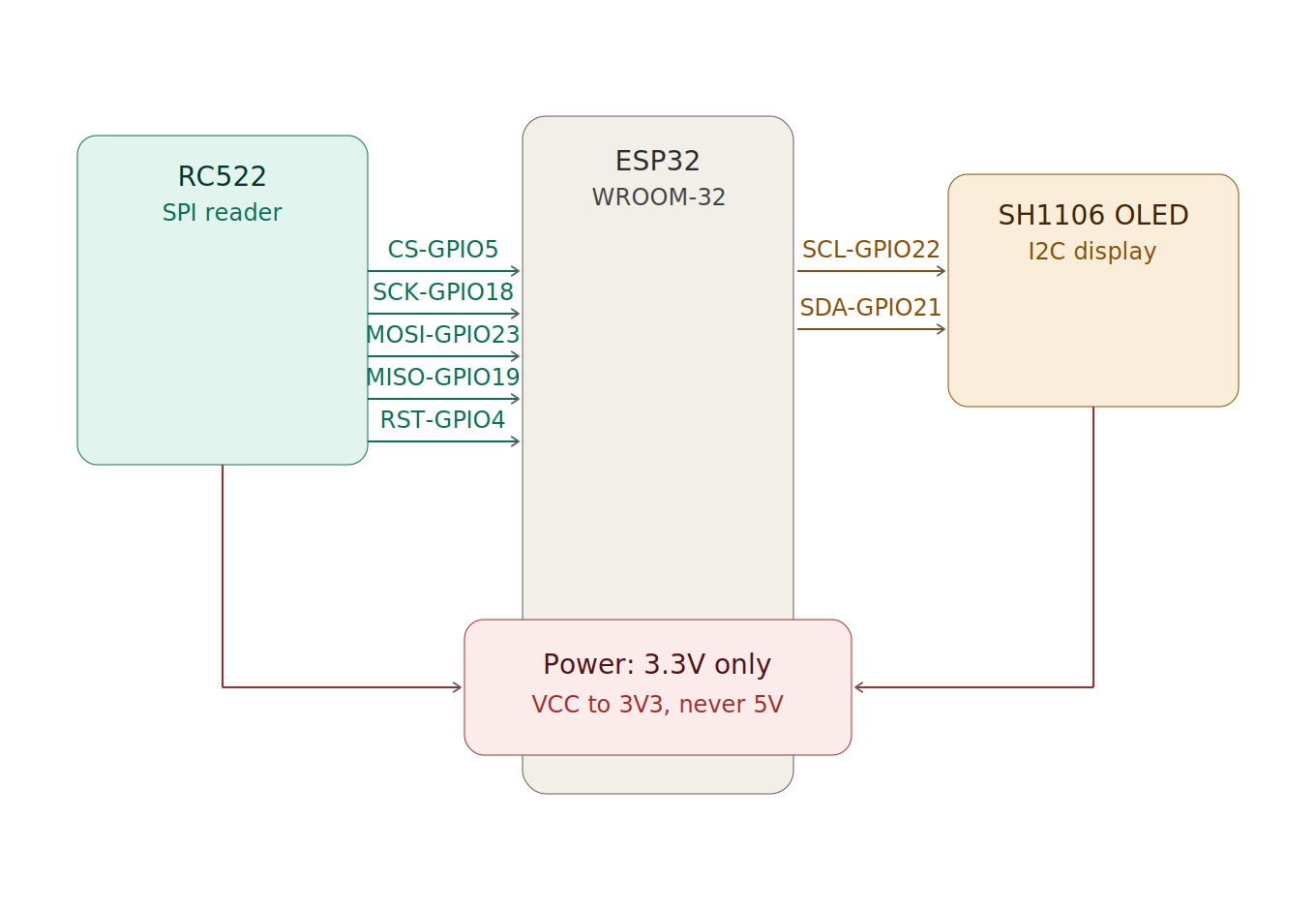
Important: Avoid the strapping pins (GPIO0, 2, 12, 15) for any of this — something pulling on them at boot can stop the board entering its bootloader. And GPIO34/35 are input-only, so they’re useless for chip-select or reset. The reset line is technically optional (the RC522 mostly works without it), but wiring it makes recovery from a wedged reader more reliable.
The full ESPHome config
The whole device firmware in one block. The rfid reader registers each known tag as a binary sensor — “is this specific disk present, yes or no” — rather than firing a one-shot scan event. That distinction is the whole design: a binary sensor gives you debounced presence state, which is what “play while present” needs; a scan event only tells you a tag arrived, never that it left.
The display reads three values pushed from Home Assistant and renders them, with two extras — long titles scroll as a marquee, and the panel blanks 10 seconds after the music stops to protect against OLED burn-in. The screensaver is self-contained: empty title starts the countdown, a new title wakes it.
esphome:
  name: tagreader
  friendly_name: Tag Reader

esp32:
  board: esp32dev
  framework:
    type: arduino

wifi:
  ssid: !secret wifi_ssid
  password: !secret wifi_password
  ap:
    ssid: "Tagreader Fallback"
    password: !secret fallback_ap_password

captive_portal:

logger:

api:
  encryption:
    key: !secret api_encryption_key

ota:
  - platform: esphome
    password: !secret ota_password

# --- SPI bus for the RC522 reader ---
spi:
  clk_pin: GPIO18
  miso_pin: GPIO19
  mosi_pin: GPIO23

rc522_spi:
  cs_pin: GPIO5
  reset_pin: GPIO4
  update_interval: 1s        # presence-off lag tracks this; ~1-2s after removal

# --- I2C bus for the OLED ---
i2c:
  sda: GPIO21
  scl: GPIO22
  scan: true
  frequency: 400kHz

# Text pulled FROM Home Assistant for the display
text_sensor:
  - platform: homeassistant
    id: np_title
    entity_id: input_text.nowplaying_title
  - platform: homeassistant
    id: np_artist
    entity_id: input_text.nowplaying_artist
  - platform: homeassistant
    id: np_status
    entity_id: input_text.nowplaying_status

globals:
  - id: marquee_pos
    type: int
    restore_value: no
    initial_value: '0'
  - id: screen_on
    type: bool
    restore_value: no
    initial_value: 'true'
  - id: off_at
    type: uint32_t
    restore_value: no
    initial_value: '0'

font:
  - file: "gfonts://Roboto"
    id: font_small
    size: 12
  - file: "gfonts://Roboto"
    id: font_med
    size: 16

display:
  - platform: ssd1306_i2c
    model: "SH1106 128x64"   # left 2 columns garbled? try "SSD1306 128x64"
    address: 0x3C            # some panels are 0x3D - check the I2C scan log
    id: oled
    update_interval: 100ms   # 100ms, not 500ms, or the marquee jerks
    lambda: |-
      bool has_track = id(np_title).has_state() && id(np_title).state.length() > 0;
      uint32_t now = millis();

      // screensaver: blank 10s after the title clears, wake on a new title
      if (has_track) {
        id(screen_on) = true;
        id(off_at) = 0;
      } else {
        if (id(off_at) == 0) {
          id(off_at) = now + 10000;   // 10s countdown -> retune here
        }
        if (now >= id(off_at)) {
          id(screen_on) = false;
        }
      }

      if (!id(screen_on)) {
        it.fill(COLOR_OFF);   // all-black: removes burn-in risk
        return;
      }

      it.printf(0, 0, id(font_small), TextAlign::TOP_LEFT, "Now Playing");
      it.line(0, 15, 128, 15);

      // marquee: scroll the title only when it's wider than the panel
      std::string title = id(np_title).state;
      int char_w = 9;                       // ~px per char at font_med - nudge 8-10 if it mis-judges
      int text_w = title.length() * char_w;
      if (text_w <= 128) {
        it.printf(0, 20, id(font_med), TextAlign::TOP_LEFT, "%s", title.c_str());
        id(marquee_pos) = 0;
      } else {
        int x = 0 - id(marquee_pos);
        it.printf(x, 20, id(font_med), TextAlign::TOP_LEFT, "%s", title.c_str());
        id(marquee_pos) += 2;
        if (id(marquee_pos) > text_w + 20) id(marquee_pos) = -128;  // gap, then loop
      }

      it.printf(0, 42, id(font_small), TextAlign::TOP_LEFT, "%s", id(np_artist).state.c_str());
      if (id(np_status).has_state() && id(np_status).state.length() > 0) {
        it.printf(127, 0, id(font_small), TextAlign::TOP_RIGHT, "%s", id(np_status).state.c_str());
      }

binary_sensor:
  - platform: status
    name: "Status"
    entity_category: diagnostic

  # One block per disk. Copy each uid EXACTLY from HA (Settings > Tags) -
  # case and hyphens must match or the sensor silently never fires.
  - platform: rc522
    uid: "04-C1-57-B9-CE-2A-81"
    name: "Disk 01"
    id: disk_01
  - platform: rc522
    uid: "04-BF-57-B9-CE-2A-81"
    name: "Disk 02"
    id: disk_02
  # ...repeat for each disk
Critical: the uid strings must match what Home Assistant logs byte-for-byte, hyphens and case included. A mismatch fails silent — no error, the sensor just never fires. Tap each tag on the reader first (it shows up under Settings > Tags) and copy the UID from there.
Don’t shrink update_interval below 1s to make removal feel snappier. Faster polling worsens the misread problem — you’ll trade a 1-2s stop delay for music that stutters mid-disk. 1s is the sweet spot.
The text helpers the display reads
The firmware references three input_text helpers — input_text.nowplaying_title, nowplaying_artist, and nowplaying_status. The OLED shows nothing until these exist. Create them in the UI: Settings > Devices & Services > Helpers > Create Helper > Text. Make three.
Important: the entity ID is derived from the name you type. “Now Playing Title” becomes input_text.now_playing_title — with underscores — which won’t match the entity_id: lines in the firmware above. Either name each helper so the ID lands on nowplaying_title (no spaces between “now” and “playing”), or edit the firmware to match whatever IDs you end up with. A silent mismatch here is the most likely reason a freshly-built reader shows a blank screen.
Home Assistant: three automations
This is where the system thinks. The reader is dumb on purpose. These live in Home Assistant, not on the device — each is a complete automation you can paste straight into the YAML editor.
1. Play and stop. One automation watches every disk’s presence sensor. Disk present -> switch the Sonos to the Music Assistant source, set the volume, play the mapped playlist. Disk absent -> stop. The disk-to-playlist mapping is a single lookup table, so adding a disk is one new line in the map plus one binary sensor in firmware — not a new automation per disk.
alias: "Slot Reader: Play While Present"
description: Plays the mapped playlist while a disk is in the slot; stops on removal.
triggers:
  - trigger: state
    entity_id:
      - binary_sensor.tag_reader_disk_01
      - binary_sensor.tag_reader_disk_02
      # ...one line per disk
    to: "on"
    id: inserted
  - trigger: state
    entity_id:
      - binary_sensor.tag_reader_disk_01
      - binary_sensor.tag_reader_disk_02
      # ...one line per disk
    to: "off"
    id: removed
variables:
  target_speaker: media_player.living_room_2
  target_volume: 0.3
  disk_map:   # binary_sensor entity -> Spotify URI. Add a line per disk.
    binary_sensor.tag_reader_disk_01: spotify:playlist:1NY1ZsQPf1R8gwBQZx1jIG
    binary_sensor.tag_reader_disk_02: spotify:playlist:6uq4jqPumwrfC82M50YDm4
    # ...
actions:
  - choose:
      - conditions:
          - condition: trigger
            id: inserted
        sequence:
          - action: media_player.select_source
            target:
              entity_id: "{{ target_speaker }}"
            data:
              source: Music Assistant Queue
          - action: media_player.volume_set
            target:
              entity_id: "{{ target_speaker }}"
            data:
              volume_level: "{{ target_volume }}"
          - action: music_assistant.play_media
            target:
              entity_id: "{{ target_speaker }}"
            data:
              media_id: "{{ disk_map[trigger.entity_id] }}"   # which disk fired
      - conditions:
          - condition: trigger
            id: removed
        sequence:
          - action: media_player.media_stop
            target:
              entity_id: "{{ target_speaker }}"
mode: restart
2. Update the display. Watches the Sonos for track changes and for playback resuming, then copies title and artist into the helpers. Watching “resumed playing” as well as “track changed” matters — un-pausing the same track doesn’t change the track, so without that trigger the screen wouldn’t come back after a pause.
alias: "Now Playing: Update Display"
description: Copies the current track into the OLED helpers on track change or resume.
triggers:
  - trigger: state
    entity_id: media_player.living_room_2
    attribute: media_title
  - trigger: state
    entity_id: media_player.living_room_2
    to: "playing"            # without this, un-pausing the same track won't refresh the screen
condition:
  - condition: template
    value_template: >-
      {{ state_attr('media_player.living_room_2', 'media_title') not in [none, ''] }}
actions:
  - action: input_text.set_value
    target:
      entity_id: input_text.nowplaying_title
    data:
      value: "{{ state_attr('media_player.living_room_2', 'media_title') | truncate(255, true, '') }}"
  - action: input_text.set_value
    target:
      entity_id: input_text.nowplaying_artist
    data:
      value: "{{ state_attr('media_player.living_room_2', 'media_artist') | default('', true) | truncate(255, true, '') }}"
  - action: input_text.set_value
    target:
      entity_id: input_text.nowplaying_status
    data:
      value: "{{ '>' if is_state('media_player.living_room_2', 'playing') else '||' }}"
mode: restart
3. Clear the display. Blanks the helpers when playback genuinely stops, which lets the screensaver fire. “Genuinely” is doing the work. Skipping a track makes the player flicker through a transitional state for a fraction of a second, and a naive clear reads that blip as “stopped” and kills the screen mid-song. The fix: require the stopped state to persist before clearing.
alias: "Now Playing: Clear Display"
description: Blanks the OLED helpers when playback genuinely stops, letting the screensaver fire.
triggers:
  - trigger: state
    entity_id: media_player.living_room_2
    to: ["idle", "off", "standby"]   # NOT "paused" - that's the skip-transition state
    for:
      seconds: 3                     # a skip blips through faster than this
actions:
  - action: input_text.set_value
    target:
      entity_id: input_text.nowplaying_title
    data:
      value: ""
  - action: input_text.set_value
    target:
      entity_id: input_text.nowplaying_artist
    data:
      value: ""
  - action: input_text.set_value
    target:
      entity_id: input_text.nowplaying_status
    data:
      value: ""
mode: single
That third one was the last real bug, and it’s the lesson of the whole build: the hardware worked early, but skips, pauses, and removal each needed the state machine taught what “stopped” actually means.
Lessons learned
- RC522 unreliable presence detection — fix it with disk geometry, not a new reader. A captured tag in a slot is the stable case; the flakiness is a hovering-tag problem.
- ESPHome binary_sensor uid not matching — copy the UID from HA byte-for-byte, hyphens and case included. It fails silent otherwise.
- RC522 update_interval too low causes stutter — keep it at 1s. Faster polling makes misreads worse, not removal faster.
- OLED stays blank after building — the input_text helper IDs don’t match the firmware. Check for underscores the UI inserted into the name.
- OLED display blanks during track skip — your clear automation is firing on the transitional state. Exclude
pausedand add afor:delay so a skip can’t qualify as stopped. - Now-playing screen won’t return after pause — your display-update automation only triggers on track change. Add a trigger on the player returning to
playing. - ESP32 DevKit has no GPIO16/17 broken out — use GPIO21/22 for I2C, the standard pins anyway.
- SH1106 garbage in the first two columns — switch the model string to
SSD1306 128x64; the driver offset differs.
The rfid reader reports presence; Home Assistant decides everything else. That split is why the messy parts stayed in software where they’re cheap to fix, and why swapping the reader later — if I ever do — changes nothing above the firmware line.